OpenScreen is your free, open-source alternative to Screen Studio (sort of).
If you don't want to pay $29/month for Screen Studio but want a much simpler version that does what most people seem to need - quick, polished product demos and walkthroughs you'd post on X, Reddit. OpenScreen does not offer all Screen Studio features, but covers the basics well!
Screen Studio is an awesome product and this is definitely not a 1:1 clone. OpenScreen is a much simpler take, just the basics for folks who want control and don't want to pay. If you need all the fancy features, your best bet is to support Screen Studio (they really do a great job, haha). But if you just want something free (no gotchas) and open, this project does the job!
100% free for both personal and commercial use. Use it, modify it, distribute it — just be cool 😁 and shout out the project if you feel like it.
Free, open-source macOS app manager and system cleaner.
Uninstall apps completely. Find orphaned files. Clean system junk.
No subscriptions. No telemetry. No data collection.

The Equal Earth Wall Map is for schools, organizations, or anyone who needs a map showing countries and continents at their true sizes relative to each other. Africa appears 14 times larger than Greenland as it actually is. And wherever you live, the map has you covered. Download a choice of three versions centered on these regions: Africa/Europe, the Americas, and East Asia/Australia.
Other features include:
• It’s free. Download the map and print as many copies as you want.
• It’s big. The map measures 55” wide x 29” tall (1.4 x 0.74 meters). You can print it even larger thanks to the very high resolution.
• Just enough detail. The 2,600+ map labels provide geographic context without overwhelming you with too much information.
• Professional design. With pleasing colors, readable type, and clear visual hierarchies, this is a map that you will want to look at.


Put an unused key to work
Convert the caps lock key or any modifier key to the hyper key, all four modifiers combined: ⌃⌥⌘⇧
The hyper key acts as an additional modifier key that you can use in any app with keyboard shortcuts.
Or just remap caps lock to a more useful key.
Private cloud storage,
secure file sharing.
Sync, share and collaborate on files,
on your own server, and under your control.

Docker Autoheal
Monitor and restart unhealthy docker containers. This functionality was proposed to be included with the addition of HEALTHCHECK, however didn't make the cut. This container is a stand-in till there is native support for --exit-on-unhealthy
OldUnreal, purely devoted to the old Unreal (Tournament) versions
OldUnreal is a non profit community to support, update, develop and play older Unreal Engine1 games such as Unreal and UnrealTournament. We have forums for Unreal II, Deus Ex, Rune, The Wheel of time and many more titles.

The PokeRom Codex is a 'dex of romhacks, fan games, and resources, designed to guide trainers through the vast sea of Pokémon creativity without tearing anyone down to do so. It's your one-stop catalog for finding the perfect experience for you, featuring an easy-to-navigate, community-enhanced, tag-based system that connects trainers to their ideal Pokémon adventure~ It will never link directly to a ROM and will link to the original release and sources wherever possible!
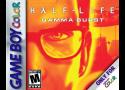
Half-Life: Gamma Burst is a reimagined Game Boy Color demake of the 1998 original.
This release is a playable teaser, focused on the Hazard Course section of the game. It showcases some core gameplay systems, early visual style, and atmosphere of the project, adapted to a top-down, 8-bit format.
The full campaign, inspired by the main Half-Life storyline and the events of Black Mesa, is currently in development.
Features in this playable teaser:
Classic Half-Life inspired environments and characters

Authentic Game Boy Color style visuals and color palettes

Key dialogue and moments adapted from the original Hazard Course
A neato calendar with the full year on a single page.

Goldberg Steam Emulator
This is a steam emulator that emulates steam online features on a LAN. It works on both Linux and Windows. For a readme on how to use it see: The Release Readme
You replace the steam api .dll or .so with mine (for complete steps see the Release Readme) and then you can put steam in the trash and play your games either in single player on on LAN without steam (Assuming the games have no DRM and use Steam for online).
If you are a game developper and made the mistake of depending too much on the steam api and want to release of version of your game without it and don't want to rewrite your game, this is for you. It is licenced LGPLv3+ so the only source code you need to publish is the source code of this emulator (and only if you make modification to it).

This project aims to enhance the working environment on Windows
This projects aims to fix some issues in Grand Theft Auto IV: The Complete Edition, as well as add various new features for modern systems.
Effortless Alt+Tab switching and dock previews that respect your privacy. No data collection. No cloud sync. Just pure productivity.

CleanupBuddy locks the keyboard and mouse/trackpad so that you can clean your Mac without having to turn it off and without typing a bunch of gibberish during the process.
It also includes an animated character and snarky remarks to keep you entertained!