By utilizing a simple and minimal usage syntax, that requires a flat learning curve, taskbook enables you to effectively manage your tasks and notes across multiple boards from within your terminal. All data are written atomically to the storage in order to prevent corruptions, and are never shared with any third party entities. Deleted items are automatically archived and can be inspected or restored at any moment.
One of the few features I missed from Mac OS X is Quick Look. It allows user peek into a file content in a lightening speed by just pressing the Space key. Windows, on the other hand, does not has this handy feature ... until now.
I am aware that several alternatives are already available on the Internet (e.g. WinQuickLook and Seer). Despite these options, I still decide to craft another one by myself, because they are either not being actively developed, lacks of variety, or asks for a amount of $$$.
1. List available local snapshots
First of all, you need to find out how many local snapshots exist in your local SSD. To do so, you need to execute the following command:
sudo tmutil listlocalsnapshots /Volumes/
2. Delete local snapshots
Next, you need to manually delete each local snapshot based in there <snapshot_date>.
sudo tmutil deletelocalsnapshots 2017-10-20-002004
sslh accepts connections on specified ports, and forwards them further based on tests performed on the first data packet sent by the remote client.
Probes for HTTP, SSL, SSH, OpenVPN, tinc, XMPP are implemented, and any other protocol that can be tested using a regular expression, can be recognised. A typical use case is to allow serving several services on port 443 (e.g. to connect to SSH from inside a corporate firewall, which almost never block port 443) while still serving HTTPS on that port.
Hence sslh acts as a protocol demultiplexer, or a switchboard. Its name comes from its original function to serve SSH and HTTPS on the same port.
Your personal research assistant
Zotero is a free, easy-to-use tool to help you collect, organize, cite, and share research.
You can search for game patches using the both the Title ID & Title Name!
What is Citra?
Citra is a work-in-progress Nintendo 3DS emulator started in early 2014. Citra can currently emulate, with varying degrees of success, a wide variety of different homebrew applications and commercial software.
iftop ist ein Kommandozeilenwerkzeug zum Überwachen des Netzwerkverkehrs (Traffic) in Echtzeit, ähnlich wie das Programm top zum Überwachen der Prozesse.
iftop listet alle Netzwerkverbindungen einer Netzwerkschnittstelle übersichtlich auf und zeichnet im Hintergrund ein Balkendiagramm. Die Einträge können dabei nach verschiedenen Kriterien sortiert werden, vorrangig jedoch nach Bandbreite.
Turbo Boost Switcher is a little application for Mac computers that allows to enable and/or disable the Turbo Boost feature.
It installs a precompiled kernel extension (32 or 64 bits depending on your system) that updates the Turbo Boost MSR register, so It will ask for your admin password when using it.
It’s installed on your Mac status bar and allows you to:
- Languages: English, Spanish, Chinese (beta), Russian (beta), German (beta), Polish (beta), French (beta), Swedish (beta)
- macOS High Sierra ready.
- Visually know if Turbo Boost is enabled or disabled at any time.
- Enable / Disable Turbo Boost manually, getting up to a 25% more battery life and lowering down the CPU Temp up to 20ºC. (check this).
- Fan and Temperature charts.
- Configure it to disable Turbo Boost automatically at launch.
- Enable / Disable Turbo Boost automatically for a set of apps (only on Pro version).
- Set default mode for Turbo Boost Enabled or not (On or Off)
- Disable Turbo Boost when battery charger is not connected (only on Pro version).
- Disable Turbo Boost automatically when battery goes below a configurable level (only on Pro version).
- OSX Notifications/Alerts integration (only on Pro version).
- Asks for root password only once (only on Pro version).
- Status Bar configurable.
- Status Bar fully configurable (Temperature, fans, etc, only on Pro version).
- Display CPU Load
- Check your CPU temp and fan speed.
- Display temps in ºC and ºF (only on Pro version).
- Set it to open at login.
-Automatically restore Turbo Boost on exit.
Upload and share your files with BayFiles.
Max 10 GB per file - unlimited downloads and no speed limits.
HLSW is a game server administration and server browsing tool that allows gamers to not only search for game servers and connect to them easily, but also allows administrators the ability to remotely monitor their server.
HLSW's list of supported games is constantly expanding, with more and more games having full RCON support allowing for administrator to not only remotely monitor their servers, but also to administrate them without ever having to join the game server.
In addition to being a powerful server browse and administration tool, HLSW also contains an integrated messenger facility allowing users to create a friends list and chat through the tool, or simply see where their friends are playing and join them.
In addition to this, HLSW provides status indicator's allowing users to advertise their profile where ever they wish. The banner's are configurable in different sizes and skins, and can be easily embedded into forums and web pages. The graphic shows the user's favourite games and the game server he's currently playing on. By a simple click onto the banner other users can join or add you to their buddy list.
HLSW is currently available for Windows, and is available in the following languages: German, English, Chinese, Czech, Danish, Spanish, Finnish, French, Hungarian, Dutch, Norwegian, Polish, Portuguese, Russian, Slovak, Swedish, Turkish.
Chatrooms, articles, video-conferences; Movim centralizes all you need to communicate with your colleagues, friends or family in one simple interface.
It also fully adapts to all your devices from your smartphone to your desktop computer.
FreshRSS is a self-hosted RSS feed aggregator such as Leed or Kriss Feed.
It is at the same time lightweight, easy to work with, powerful and customizable.
It is a multi-user application with an anonymous reading mode. It supports PubSubHubbub for instant notifications from compatible Web sites. There is an API for (mobile) clients, and a Command-Line Interface. Finally, it supports extensions for further tuning.
Vienna is an RSS/Atom reader for Mac OS X, packed with powerful features that help you make sense of the flood of information that is distributed via these formats today. The Vienna Project is continuously being improved and updated, so keep up to date with current development on the forums.
Vienna is an OS X-native Objective-C/Cocoa Open Source project published under the Apache License, Version 2.0. It was started by Steve Palmer (aka stevewpalmer, stevepa) and is currently in active development by Jeff Johnson (aka johnson1234 and jeff_johnson_dev) and Michael Ströck (aka mstroeck). Many others have contributed immensely to this project, for details please download the application and load its “Acknowledgements”.
Companies which have supported the project include GitHub, SourceForge (who provide all our web-hosting) and Senza Limiti.
FeedReader is a modern desktop application designed to complement existing web-based RSS accounts.
It combines all the advantages of web based services like synchronisation across all your devices with everything you expect from a modern desktop application.
Share one mouse and keyboard between multiple computers
Synergy combines your desktop devices together in to one cohesive experience. It's software for sharing your mouse and keyboard between multiple computers on your desk. It works on Windows, macOS and Linux.
Share one mouse and keyboard between multiple computers
Synergy combines your desktop devices together in to one cohesive experience. It's software for sharing your mouse and keyboard between multiple computers on your desk. It works on Windows, macOS and Linux.
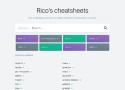
Unified access to the best community driven cheat sheets repositories of the world.
Let's imagine for a moment that there is such a thing as an ideal cheat sheet. What should it look like? What features should it have?
- Concise — It should be concise; it should only contain the things you need, and nothing else.
- Fast — It should be possible to use it instantly.
- Comprehensive — It should contain answers for every question you could have.
- Universal — It should be available everywhere, as soon as needed, without any preparations.
- Unobtrusive — It does not distract you from your main task when you are using it.
- Tutoring — It helps you to learn the subject.
- Inconspicuous — It should be possible to use it completely unnoticed.
Such a thing does exist.
Pleroma is an OStatus-compatible social networking server written in Elixir, compatible with GNU Social and Mastodon. It is high-performance and can run on small devices like a Raspberry Pi.
For clients it supports both the GNU Social API with Qvitter extensions and the Mastodon client API.