
Beautiful, Modern & Opinionated Linux by DHH
Never Type Again
Your Voice, Instantly Typed
NEVER PAY for voice to text software. Fluid is the fastest free speech recognition app for Mac, transforming your voice into text instantly with NVIDIA's AI model. Complete privacy with local processing - no cloud required.
TimeMachineEditor is a software for macOS that starts backups in Time Machine at particular times. You can choose an interval or create other types of scheduling (see the screenshots below).
This is useful if you don’t need to backup every hour and don’t want the performance penalty. For example you might be frequently creating or modifying files which would cause long-running backup operations throughout the day.


Portable file server with accelerated resumable uploads, dedup, WebDAV, FTP, TFTP, zeroconf, media indexer, thumbnails++ all in one file, no deps
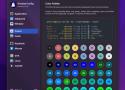

Spek is an acoustic spectrum analyser written in C++. It uses FFmpeg libraries for audio decoding and wxWidgets for the GUI.
AirPods Sound Quality Fixer And Battery Life Enhancer For MacOS
Fixes sound quality drops when using AirPods with Macs. It forces the default audio input to be the built-in microphone instead of AirPods' microphone so MacOS doesn't have to mix down the output. It also increases battery life because AirPods doesn't have to broadcast sound back. If you have more input devices you can select which device you want to force over the AirPods microphone.


Imagine an OS that works as hard as you do—streamlining your container infrastructure while cutting costs, reducing headaches, and safeguarding your business. Flatcar is engineered for those who demand efficiency, reliability, and peace of mind.


cool-retro-term is a terminal emulator which mimics the look and feel of the old cathode tube screens. It has been designed to be eye-candy, customizable, and reasonably lightweight.

Bonjeff is a Mac app that shows you a live display of the Bonjour services published on your network.
Convert docker run to docker compose recipes

LinkAce is a self-hosted tool for effortlessly archiving, organizing, and sharing your favorite web links. With a clean interface, you can save articles, bookmark tools, and preserve important content long-term. Easily categorize and retrieve your links, or share your collection with others.

Damit kann man GPX-Tracks in Videos umwandeln. Ja, das klingt ein bisschen wie HDMI auf Gardena Wasserschlauch, ergibt aber tatsächlich Sinn, siehe unten.
Das Ding spuckt bis zu 4k Video aus! Keine Registrierung nötig. Kostenlos.
Why?
Wifi networks collect a reference to your computer (called MAC address) when you login. That way, when you try to login again, even with different credentials, they detect that it is the same device and do not allow you to continue using it.
How?
By renewing your device's MAC address, the wifi network will not identify your computer and therefore is tricked into thinking it's a new device. When you try to login again it won't trigger the error message and you're free to use it.
FFmpeg is a powerful tool for manipulating audiovisual files. Unfortunately, it also has a steep learning curve, especially for users unfamiliar with a command line interface. This app helps users through the command generation process so that more people can reap the benefits of FFmpeg.
Each button displays helpful information about how to perform a wide variety of tasks using FFmpeg. To use this site, click on the task you would like to perform. You will jump to a single command or a list of related commands. Click on a command description, and the site will display a sample command as well as an explanation of how that command works with a breakdown of each of its flags (or options).
This page does not have search functionality, but you can open all recipes (second option in the sidebar) and use your browser's search tool (often ctrl+f or cmd+f) to perform a keyword search through all recipes.