
Firefox extension to automatically open websites in a container.
This tool will help you to create a Firefox profile with the defaults you like.
You select which features you want to enable and disable and in the end you get a download link for a zip-file with your profile template. You can for example disable some functions, which send data to Mozilla and Google, or disable several annoying Firefox functions like Mozilla Hello or the Pocket integration.
Each Setting has a short explanation and for the non obvious settings links to resources describing the feature and the possible problems with it.
Laden Sie DownThemAll! für Firefox herunter. The Mass Downloader for your browser
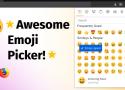
This (Firefox) add-on (WebExtension) gives you a modern emoji picker that you can use to find and select emojis (i.e. the emoticons/smileys you know from messengers such as 😃, 😎 or 🤪). It will be directly copied to your clipboard and/or inserted into the active input on the page, when you choose it.
You can then use the emojis on almost any web page, including your favorite messenger (such as WhatsApp, Telegram, Threema, Signal, Wire etc.), social media (Facebook, Instagram, Twitter, Mastodon etc.) and even e-mails.
It will remember your recently used emojis across sites, and may often be faster than the emoji picker on the site itself.

Focused reading.
Naturally.
Bionic Reading is a new method facilitating the reading process by guiding the eyes through text with artificial fixation points. As a result, the reader is only focusing on the highlighted initial letters and lets the brain center complete the word. In a digital world dominated by shallow forms of reading, Bionic Reading aims to encourage a more in-depth reading and understanding of written content.

Dark Mode For Everything

Make Medium Readable Again is a Chrome extension and Firefox add-on that improves a reading experience ruined by user engagement tactics. Medium was actually readable once; this extension aims to help people pay attention to writers' words again instead of Medium's UX.
Improves readability by
- Keeping the top navigation bar from sticking around
- Hiding the bottom "Get Updates" bar completely
- Shrinking massive header images
- Hiding "posts meter" bar and Upgrade header button
- Hiding "Open in App" button on mobile
- Blocking the "pardon the interruption" popup
- (Optionally) hiding the clap / share bar
- (Optionally) loading all post images up front, instead of lazy loading as you scroll
- (Optionally) disabling the popup menu that appears when selecting text

Private, Encrypted File Sharing
Send files through a safe, private, and encrypted link that automatically expires to ensure your stuff does not remain online forever.